


Last Updated on February 10, 2022 by Rakesh Gupta
Branding is one of the most important aspects of any business – large or small, retail or B2B. An effective brand strategy gives you a major edge in increasingly competitive markets. If so then, let us understand the nuts and bolts of branding in the context of Pardot and start finding answers to simple questions like – what is a tracker domain?; And, what does a tracker domain have to do with branding?
Tracker domains are known as CNAME (Canonical name), or vanity URL, and, they enable you to mask your Pardot hosted content (pages, form or assets) with a branded URL. When you create assets in Pardot – such as forms, custom redirects, and landing pages – Pardot generates a link that begins with go.pardot.com.

When you set up a tracker domain, it allows you to maintain your corporate branding. Branding gives assurance and security to your visitors that the links in your pages, forms or assets are legit and that they belong to your domain. In another word, a vanity URL is a unique web address that is branded for marketing purposes.

Tracker domain can not be exactly the same as your corporate domain name. Therefore, I recommend you choose a simple alias that gives your visitors the best possible user experience. For example, if your corporate domain is http://www.yourname.com, then consider using one of the following:
- www2.yoursite.com
- go.yoursite.com
- info.yoursite.com
- content.yoursite.com
Importance of Tracker Domain
The main purpose of setting up a tracker domain is to give visitors a seamless transition when traveling between pages and forms that you host and, Pardot-hosted campaign elements – such as landing pages and search results. Companies use Pardot to provide the personalized experience of their brand to visitors. At the same time, companies do not want to expose go.pardot.com to visitor’s browser URL bar. If the URL alternates between Company’s URL and go.pardot.com – when visitors flip between pages and forms – then, there is a high likelihood that they would get confused as to what organization’s website they are on! The Alias is also used for any individually tracked links sent out in emails to your prospects.
Before kicking off Pardot implementation, there are some technical items to check off the list first. One thing you want to accomplish during technical set up is getting your CNAME setup. This is an important step, as it gives your visitors a seamless transition to your Pardot hosted pages to and from other pages on your website.
Business Use Case
Let us start with a business use case. David Haditsch is working as Content Marketing Manager at GurukulOnCloud. At GurukulOnCloud, they are currently using Pardot native form, assets, landing page, etc. Now they are planning to setup a tracker domain for their pardot account. They have selected www2.gurukuloncloud.com as CNAME.
Solution for the above business requirement
You may need the assistance of your IT department, or a webmaster, to set up your tracker subdomain. To set up the CNAME, perform the following steps:
- Log on into Pardot.
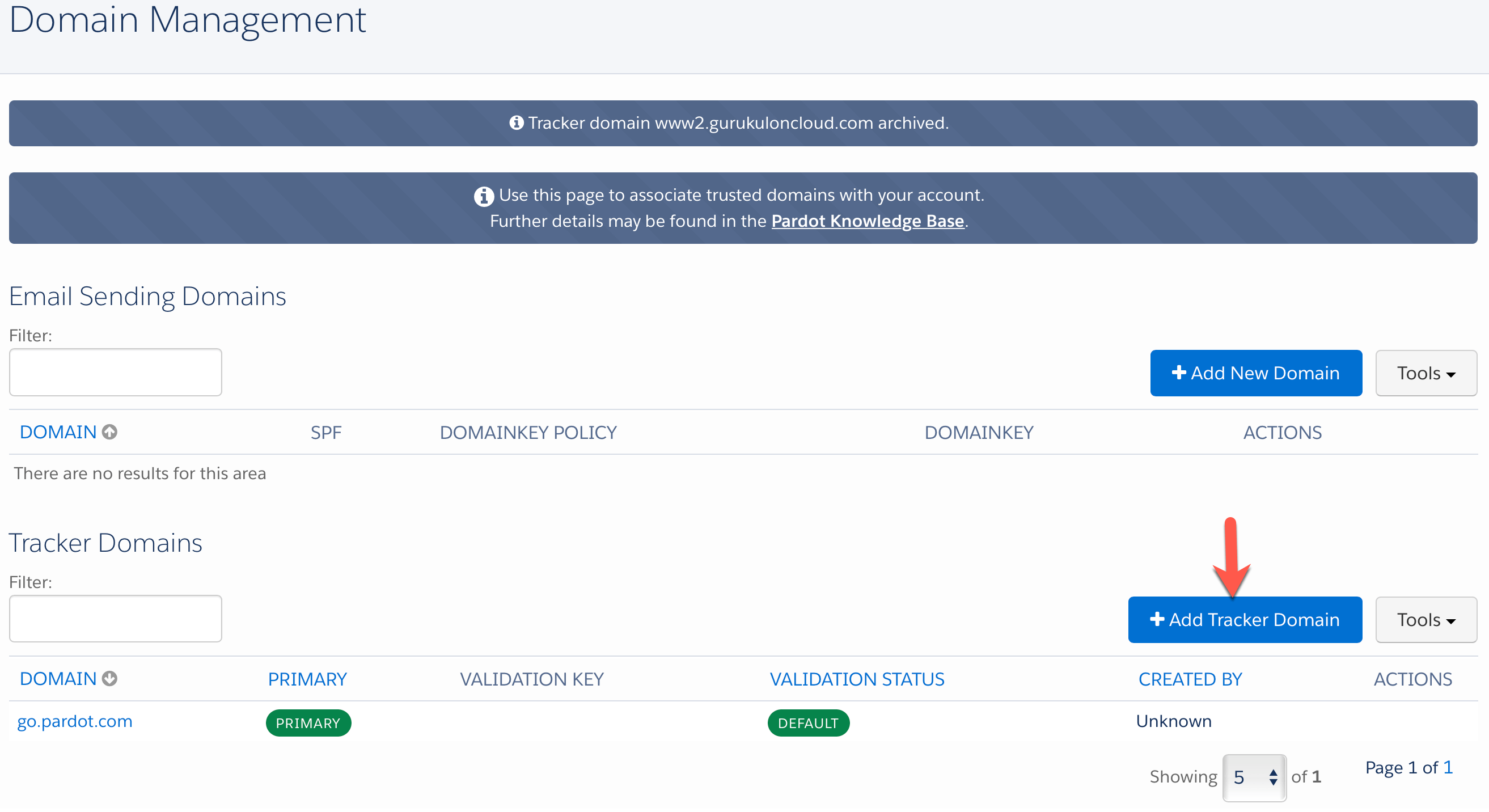
- Click on Admin | Domain Management
- Navigate to Tracker Domains, then click on the + Add tracker domain button, as shown in the following screenshot:

- This will open a small window for you, where you have to enter your tracker domain, as shown in the following screenshot:

- Once you are done, click on the Create Tracker Domain button.
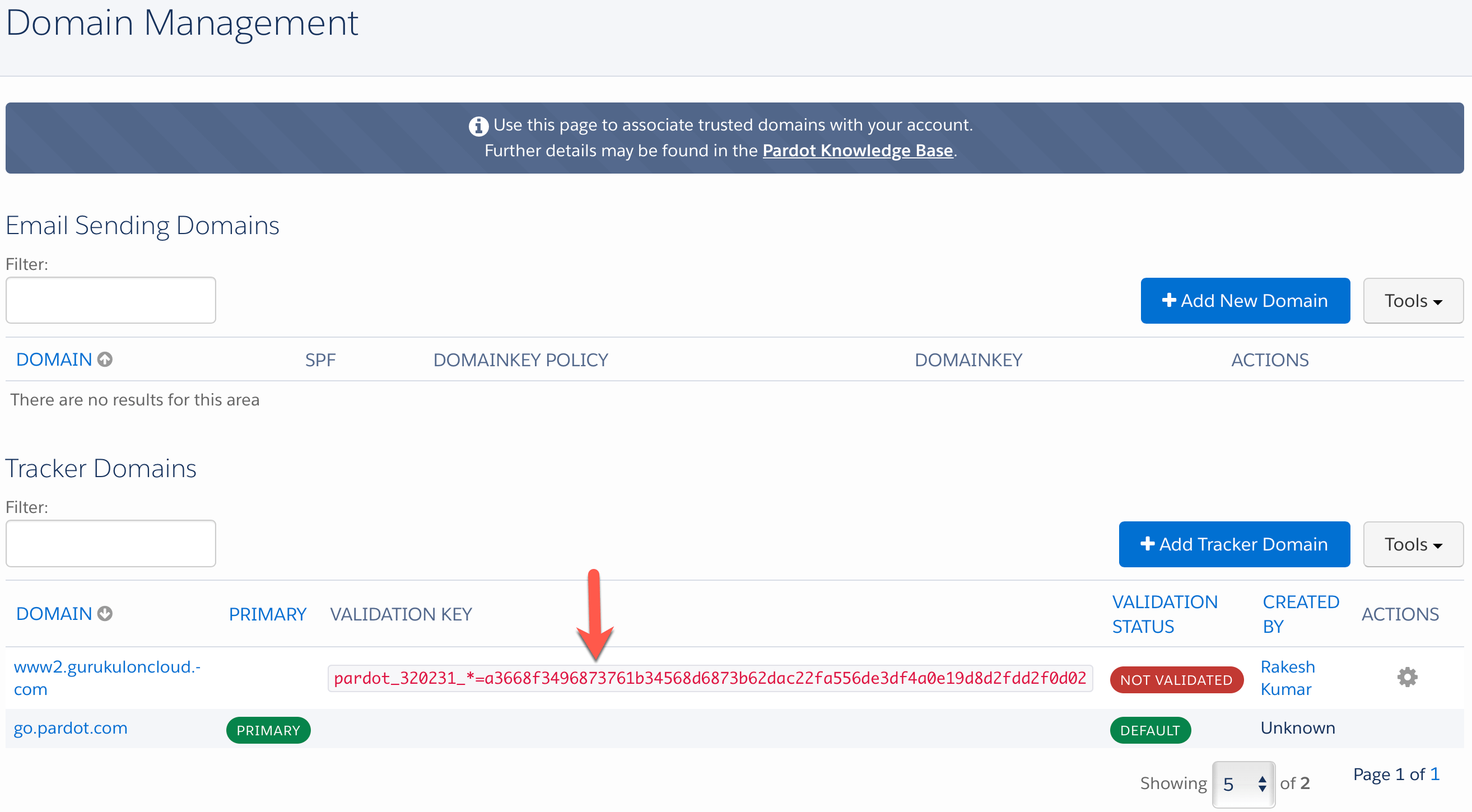
- Now copy the VALIDATION KEY and save it somewhere, as shown in the following screenshot:

-
Now work with your hosting company – or IT department – to set up a vanity CNAME for Pardot hosted campaign elements. In this case, I am responsible to do so. So, let me open cPanel of my domain management.
-
The next step is to create a CNAME. The CNAME (Canonical name or “alias”) record is used to point a subdomain to another hostname. Typically, you will have to set three things: Alias, Type, and Points to (Alias). As a result, your Alias could be www2.gurukuloncloud.com, (Type) could be “CNAME” and (Points To) will be go.pardot.com, as shown in the following screenshot:

- The next step is to set up a TXT record in your DNS with an empty host, as shown in the following screenshot:

-
Wait for your DNS to propagate (it may take up to 24 hours).
- Now log in to Pardot, and navigate to Admin | Domain Management | Tracker Domains, click the gear icon for your domain and then click Validate, as shown in the following screenshot:

- Once you have validated a domain, you can set it to primary by going through the gear icon and clicking Set as primary. Pardot auto sets the first validated domain as primary.



–> Only one primary tracker domain can be designated per account, and it must be unique across all Pardot accounts.
–> Primary tracker domain cannot be shared between Pardot accounts. If you have multiple instances of Pardot, you need to setup a different primary tracker domain for each account.
In my next blog, I will take a deeper dive by showing you how to use Custom Redirect.
Proofreader: - Munira Majmundar


What about migrating tracker domains from one Pardot to another. If we want to use the same tracker domains in the new instance do we have to invalidate the tracker domains in the old instance before being able to validate in the one?
Remove the CNAME from old Pardot instance, later configure the CNAME to another Pardot instance.
Just be aware that currently (as of Dec 2017) Pardot doesn’t support vanity/custom Tracker Domains with HTTPS enabled on your website (SSL websites).
This affects Pardot Forms {which use iframes for form embed code} and vanity URLS within Custom Redirects and Files.
Custom Tracker Domains will only work with go.pardot.com as the Primary Tracker Domain. Pardot forms and vanity URLS within Custom Redirects and Files will not work with info.mysite.com as the Primary Tracker Domain when using https due to Pardot SSL certificates.